
Introduction
Are you looking to add a high-energy boost to your website? Then you should consider adding Google Web Stories! Web Stories are immersive visual stories that are designed to engage the reader with a combination of media. This article will discuss the many benefits of Web Stories, including increased engagement and better reach, as well as provide an overview of the process of creating, publishing, and analyzing your own Web Stories. So, let’s get started and see what you can do to leverage the power of Google Web Stories on your website!
What are Google Web Stories?
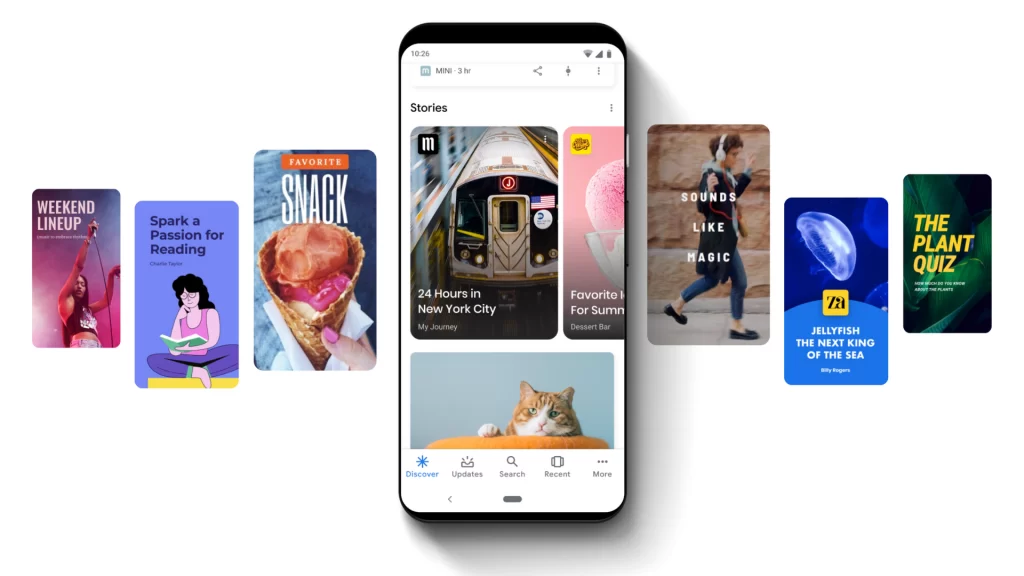
Google Web Stories are an exciting new way to tell stories and engage with your website visitors. They offer a wide range of benefits, including an interactive and visually stunning content format that provides an immersive experience for your viewers. With Google Web Stories, you can easily create an interactive narrative that links to other stories, images, audio clips, and more.
Google Web Stories are created using HTML, CSS, and JavaScript. This makes them ideal for mobile devices and other technologies such as voice assistants, as they are optimized for fast loading times and performance across all devices. This makes them a great addition to any website, as you can reach more people with a single story or create a series of stories that can be linked together.
Another benefit of using Google Web Stories is the ability to add interactive elements to your stories. From images, audio clips, and videos to interactive elements like quizzes, polls, and surveys, Google Web Stories offer a wide range of ways to engage with your audience. You can also use the stories to increase user engagement by linking to other stories or sharing the stories with other sites.
Overall, Google Web Stories are an excellent way to create visually stunning and interactive content. Not only can they help engage audiences and increase user engagement, they can also help build brand awareness and potentially increase organic traffic to your website. So, if you’re looking to create an engaging and informative experience for your website visitors, Google Web Stories are definitely worth exploring.

Why Add Web Stories to Your Website?
We live in an age where website design has become increasingly important for businesses looking to succeed. One of the most innovative tools now available to website owners is Google Web Stories, which offers three major benefits: more engagement, better reach, and an increase in credibility. In this section, we will explore these advantages in detail, and see why adding web stories to your website is essential for businesses looking to thrive in the digital age.
More Engagement
Are you looking for a creative way to increase engagement and interaction with your website? Adding Google Web Stories to your website is a surefire way to do just that! Google Web Stories is a fun and interactive format that allows you to create and share stories that appear within your website. Not only does this add more visual appeal to your website, but with its easy-to-use story creation and sharing platform, you can also engage with potential customers in a unique and engaging way. As an added bonus, Google Web Stories is also SEO friendly, meaning you can also benefit from increased visibility and reach. So, what are you waiting for? Get creative and start adding Google Web Stories to your website today!
Better Reach
Adding Google Web Stories to your website can give you a significant advantage when it comes to reaching your target audience. They are visually engaging, attention-grabbing stories crafted specifically for mobile devices that can help you connect with customers in a unique way. With Google Web Stories, you can create stunning visuals, captivating videos, and interactive elements that are sure to grab your audience’s attention. All of these elements combine to make your website truly stand out, increasing the chances of your website being discoverable by the right people. Plus, by using Google Web Stories, you can position yourself as a leader in your industry. So why wait? Get started creating your own Google Web Stories today!
Increased Credibility
When you add Google Web Stories to your website, you instantly increase your website’s credibility and trustworthiness. Not only do they give your users a more engaging and interactive way to experience your content, but they also let them know that you are serious about what you are trying to communicate. By taking the time to add Google Web Stories to your website, you are showing your visitors that you take the time to appeal to their interests and keep them informed. Google Web Stories offer a wealth of potential benefits and can help to set your website apart from others in your industry.
How to Create and Publish Web Stories on Your Website
Google Web Stories are an exciting new way to tell a story and add engaging visuals, text, and audio to your website. In this section, we’ll explore the benefits of adding Google Web Stories to your website, and we’ll walk through the steps of creating and publishing your Web Story, including how to create the story, add the plugin to your website, and publish the Web Story. Get ready to give your website the wow factor with Google Web Stories!
Create the Story
Creating a Google Web Story is a great way to add a unique and engaging element to your website. Get started by brainstorming ideas for stories that will capture the attention of your audience and bring life to your website. Consider unique visuals, animations, and interactive elements to make your story stand out. When you have a story concept in mind, use the Google Web Stories Creator to bring it to life. This user-friendly design interface allows you to easily create and customize your story with just a few clicks. Add images, videos, music, and interactive elements to engage your viewers and create a custom story for your website. Don’t forget to include the keywords Google Web Stories to make sure your story is discoverable by search engines.
Add the plugin to Your Website
Ready to add the Google Web Stories plugin to your website? Adding this plugin is easy and will unlock a whole new range of potential! You can quickly set up the plugin and start creating web stories that will engage your visitors and create a more interactive experience. Plus, the Google Web Stories plugin is compatible with all major browsers and devices, so you don’t have to worry about compatibility. Don’t wait any longer, start creating high-energy, interactive website experiences by adding the Google Web Stories plugin to your website today!
Publish the Web Story
Ready to publish your awesome Google Web Story? Great! Once you have completed your story and added any necessary editing touches, it’s time to hit that publish button. Publishing your Web Story is a simple process, and can be done in just a few clicks. With your website URL at hand, open Google Web Stories and follow the instructions to upload and publish your story. This will generate a direct link to your story, making it easy for others to find and share. Congratulations, you are now a published Web Story author!
Analyzing Your Google Web Story Performance
Are you looking for a way to get more attention for your website and increase your user engagement? Then you should look no further than the exciting new feature from Google, called Google Web Stories! These stories are interactive mini-applications that let you embed dynamic, engaging content into your website.
But that’s not all. As a website owner, you also have the ability to measure the performance of your Google Web Stories to ensure that your content is as effective as possible. Here, we’ll show you how to analyze your Google Web Story performance and get the most out of it.
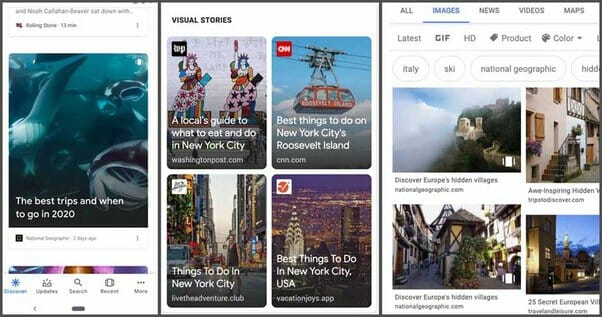
First, you’ll want to determine the best way to track your Google Web Story performance. You can do this by using Google Analytics, which provides insights into how people are engaging with your Web Story. You can track page views, average user time spent on your Web Story, and click-through rates.
Once you have an understanding of how people are engaging with your Web Story, you can start to tweak your content. For example, if you find that certain elements of your Web Story are not performing well, you can make changes to improve engagement. You can make adjustments to the design, add more visuals, or even create new content for your Web Story.
Finally, you can use A/B testing to maximize the performance of your Web Story. This is a great way to determine which elements of your Web Story work best and optimize your content for maximum engagement.
By analyzing your Google Web Story performance, you can ensure that your content is as effective and engaging as possible. With the right approach, you can make your Web Story stand out and attract more users to your website. So, start exploring the benefits of adding Google Web Stories to your website today!
Guidelines for Creating an Effective Web Story
Adding Google Web Stories to your website can be a great way to engage your audience and increase user engagement levels. In addition to being visually compelling, Web Stories provide an interactive and compelling user experience. When creating an effective Web Story for your website, there are some key guidelines to follow.
First, it’s important to keep your Web Story concise, with no more than 10 slides and no more than 10 words per slide. This will ensure your Web Story is engaging and easy to follow. Make sure you include a call-to-action at the end of your Web Story to encourage visitors to take action, like subscribing to your newsletter or visiting your website for more information.
Next, you should create visually compelling and relevant images or videos to add to your Web Story. This will help your story stand out and make it more engaging. Be sure to include high-quality images, videos, and text that capture the viewer’s attention.
Lastly, create a unique URL for your Web Story to make it easy to find. This will allow your visitors to quickly and easily access your Web Story. Additionally, consider optimizing your Web Story for SEO by including relevant keywords. This will help your Web Story show up in search engine results, increasing your chances of getting more views.
By following these guidelines, you can create an effective and engaging Google Web Story for your website. With the right content and visuals, your story will capture the attention of your visitors, increasing user engagement and helping you reach your goals.
Conclusion
In conclusion, Google Web Stories are an exciting, innovative way to engage with your website visitors, increase your reach, and enhance your credibility all in one! If you are looking for a new way to creatively share your message, these stories are definitely a great option. With the right strategy, you can utilize the power of Google Web Stories to create maximum online engagement and delight your users. Don’t hesitate – to add Google Web Stories to your website today and watch your visitor engagement skyrocket!
